






What's so special about the X-Box?
X-Box FAQ Frequently Asked Questions
Flashing the TSOP of your Xbox Tutorial
X-Box UXE Softmod Installation tutorial
Flash the Firmware of your Xbox 360
IMPORTANT: These tests were made by examining xbox consoles There's NO guarantee
the tests are 100% correct.
View the Photos that follow and compare them with your open Xbox, choose the one that
looks like your Xbox and read the text that accompanies that photo for more information.
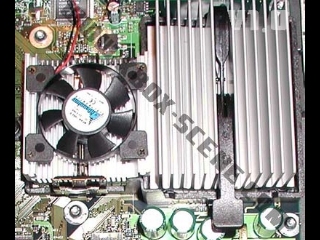 |
If your GPU has a Fan on top of it like this picture you have a Version 1.0 |
 |
If your GPU has no Fan on top of it you will need to check the power connectors in the next set of photos to figure out which Version you have. |
 |
If your Power Connector looks like this and you have no fan on the GPU then you have a Version 1.1 |
 |
If your Power Connector looks like this and you have no fan on the GPU then you have a Version 1.2 to 1.6 |
Now lets make sure its not a Version 1.6/1.6b Xbox or your TSOP mod stops here.
Find your video chip which is located just above the GPU heatsink if unsure look at photo below
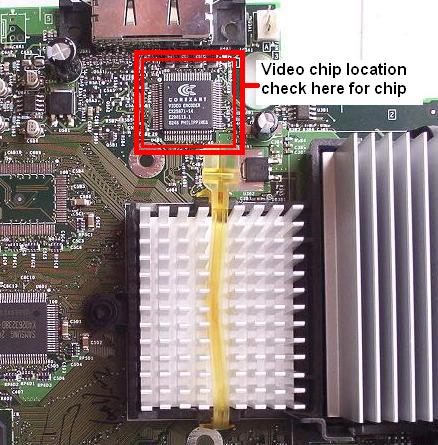
 |
If you see this chip then your are to safe continue with your TSOP flashing | |
 |
If you see this chip then your are to safe continue with your TSOP flashing | |
 |
If your chip looks like this then you are have a Version 1.6/1.6b You must use the UXE exploit which is a software solution that offers most of the benefits that a TSOP flash does including installing a larger hard-drive, to see the tutorial click Here |
The 1.2 to 1.5 Xbox's have the both sets of solder points on top of the motherboard
You need to use 256k bios.
The 1.0/1.1 Xbox's need points soldered on the top and bottom of the motherboard
You need to use a 1mb bios
The 1.6/1.6b xbox's can't be flashed so you have to use UXE